
DraftPilot Community Update - Making AI Feel Natural
Easily see which clauses have a DraftPilot redline suggestion, right in the contract

The AI "Arms Race" Isn't Everything
I've been thinking a lot about what makes legal tech stick. Not just get bought and 'check the boxes', but actually get used day-to-day by busy lawyers.
This requires it to be super intuitive and not force lawyers to change how they work.
That's ultimately what will give us a real edge in winning this market.
After all, the underlying AI keeps getting better at an incredible pace. And every legal tech provider can tap into these improvements. So there's no real lasting 'moat' there.
While we obsess over making our AI really accurate, the real magic isn't just in the AI - it's in making the tool feel incredibly natural to use.
The Electric Bike Effect
Reminds me of electric bikes (I love hopping around London on Lime Bikes).
The reason it's so easy for any cyclist to switch to electric bikes is that you just do what you normally do (start pedaling), and like magic everything feels... a lot easier.
So that's our North Star at DraftPilot. As a lawyer, you should be able to work like you're used to (in Word, scrolling through a contract), and the tool should feel like a magic assist.
I feel our tool was part of the way there, but it did force you to more or less 'start' your review by clicking on 'issues' in the add-in. You'd click on an issue, and the Word doc would jump to the relevant clause.
That's not super natural, as most lawyers want to start by scrolling through the Word doc itself, and want the tool to surface relevant drafting suggestions when they reach a given clause.
We've now deployed a big new release that enables just that. We call it "Highlights".
Highlights
As you scroll through a contract in Word, you'll now see subtle blue highlights where DraftPilot has suggestions. Just click any highlight in the doc itself, and DraftPilot will automatically ‘jump’ to its drafting suggestion:
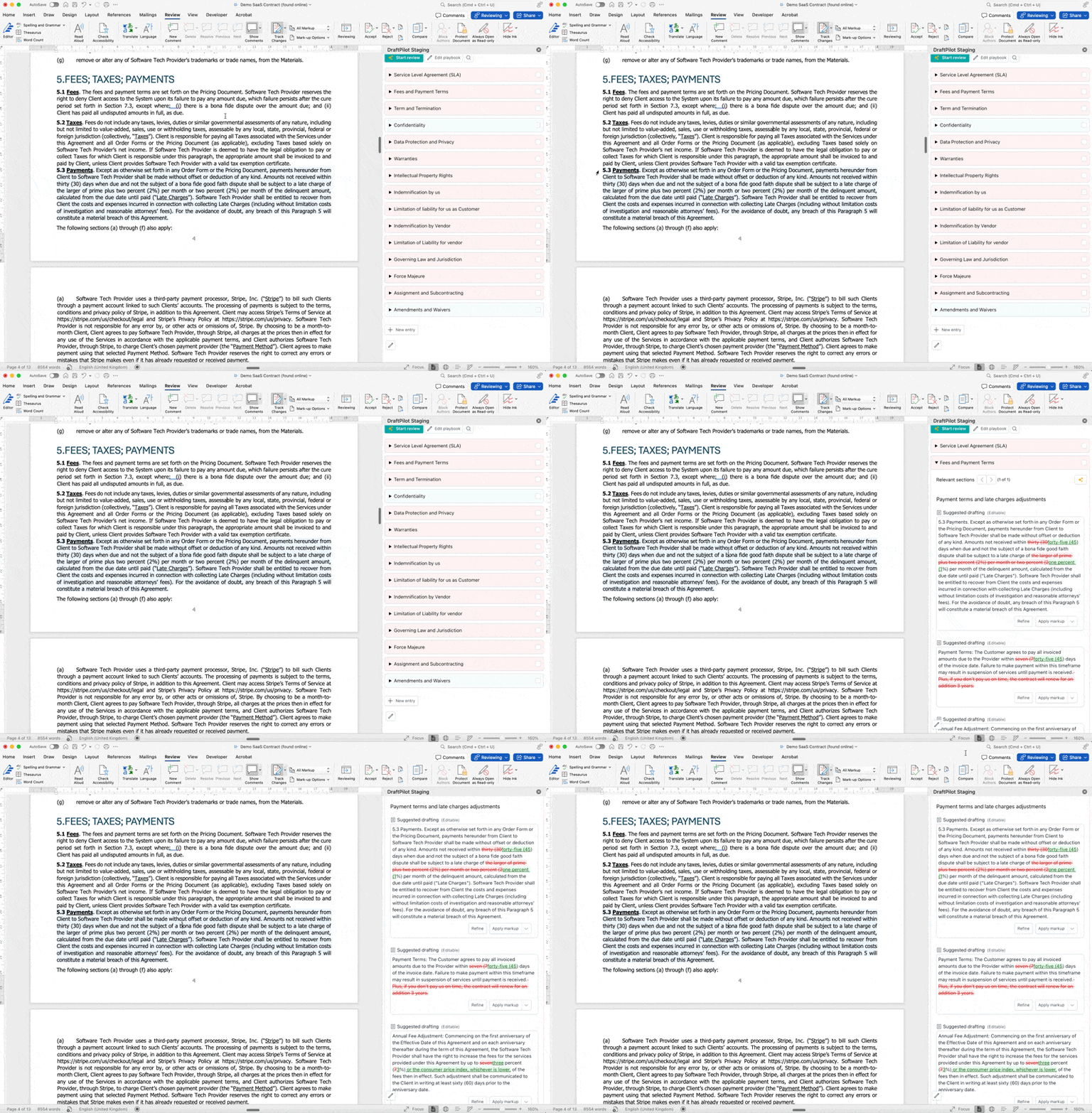
The highlights are temporary and invisible to anyone you send the document to - they're just there to gently guide you while you work.
See It In Action
Here's a quick demo showing how it all works:
New Feature - Issue highlights now visible in Word doc itself - Watch Video (3 mins)

Other news
The last few months have been very busy on the commercial side. We've signed up several in-house legal teams, ALSPs and law firms, with lots of new pilots currently underway.
Most larger teams want to really try-before-they-buy (often for longer than the trial period), which I get, so it's nice to see these pilots converting now.
On the marketing side, we still haven't done any paid advertising - so far it's all been word-of-mouth plus my LinkedIn posts, which is encouraging.
We're also now offering discounts to clients with well known brands, in exchange for client case studies. The first couple of these should be ready soon, which will help on the marketing side too!
In short, we're all really amped up about growing further in 2025.
Hope you all are having a great start to the year as well!
Daniel
—
Daniel van Binsbergen
CEO at DraftPilot